Project Overview
For a long time I had experience with Type-2 Virtualization, also known as Hosted VMs. Using VirtualBox, I would run virtual machines on either my machines running Windows 11 or Linux. However, I would notice a decrease in performance when I ran VMs on either. I learned from a friend about Type-1 Virtualization, and an OS that accomplishes this called Proxmox. With Proxmox, I can run several virtual machines without the system overhead that I get with hosted VMs. I also have the ability to access my Proxmox VMs remotely even outside of my LAN, since the server sits on a Tailscale network rather than being exposed to the internet. That same tailnet is what lets my website's Kubernetes cluster scrape these metrics.
Hosting a Proxmox server also allowed me to play around with Windows Server 2022, as I wanted to learn how to use Active Directory and use its DHCP services to lease IP addresses to other machines on my hypervisor. In addition, I used Ansible playbooks to manage my server and practice IaC principles.
Objectives
- Install Proxmox on a used laptop and open the web UI on another machine
- Run Windows Server 2022 and configure Active Directory
- Configure Prometheus and Grafana to monitor my Proxmox server
- Use Ansible playbooks to automate management of my server and replicate IaC pipelines
The Process
Step 1: Installation and running VMs
Once I got my hands on a spare laptop, I downloaded an instance of Proxmox and installed it using a flash drive. I also got an ISO of two Operating Systems being Windows Server 2022 and Kali Linux. Once I had Proxmox set up and running, I navigated to the IP address of my Proxmox server on another machine and logged into the web UI.
Step 2: Configuring Windows Server 2022 and Kali Linux
After installing both operating systems as VMs, I created a second network bridge and put my Kali Linux instance on that bridge. A Proxmox bridge essentially acts as a Layer 2 Switch in my setup, so having two of them separates my devices by Data Link Layer. I put both network bridges in my Windows server and I set up DHCP services on it. I was able to get it to run, and after setting the scope and authorizing it, my Kali Linux device was able to get an IP address from my Windows Server and it could ping the internet. I downloaded and installed an instance of Ubuntu and tested it there as well, and it received the IP address next in the lease lineup.
Step 3: Running Prometheus and Grafana for remote monitoring
By this point I wanted a way to monitor my server remotely without having to log into the Web UI itself. In my volunteer work for setting up networks, one of my tasks was to have our nodes set up with a cloud-init, and in that cloud-init I added a Prometheus-node-exporter package to allow for our servers to extract information. That gave me the idea to install Prometheus and Grafana for monitoring my server.
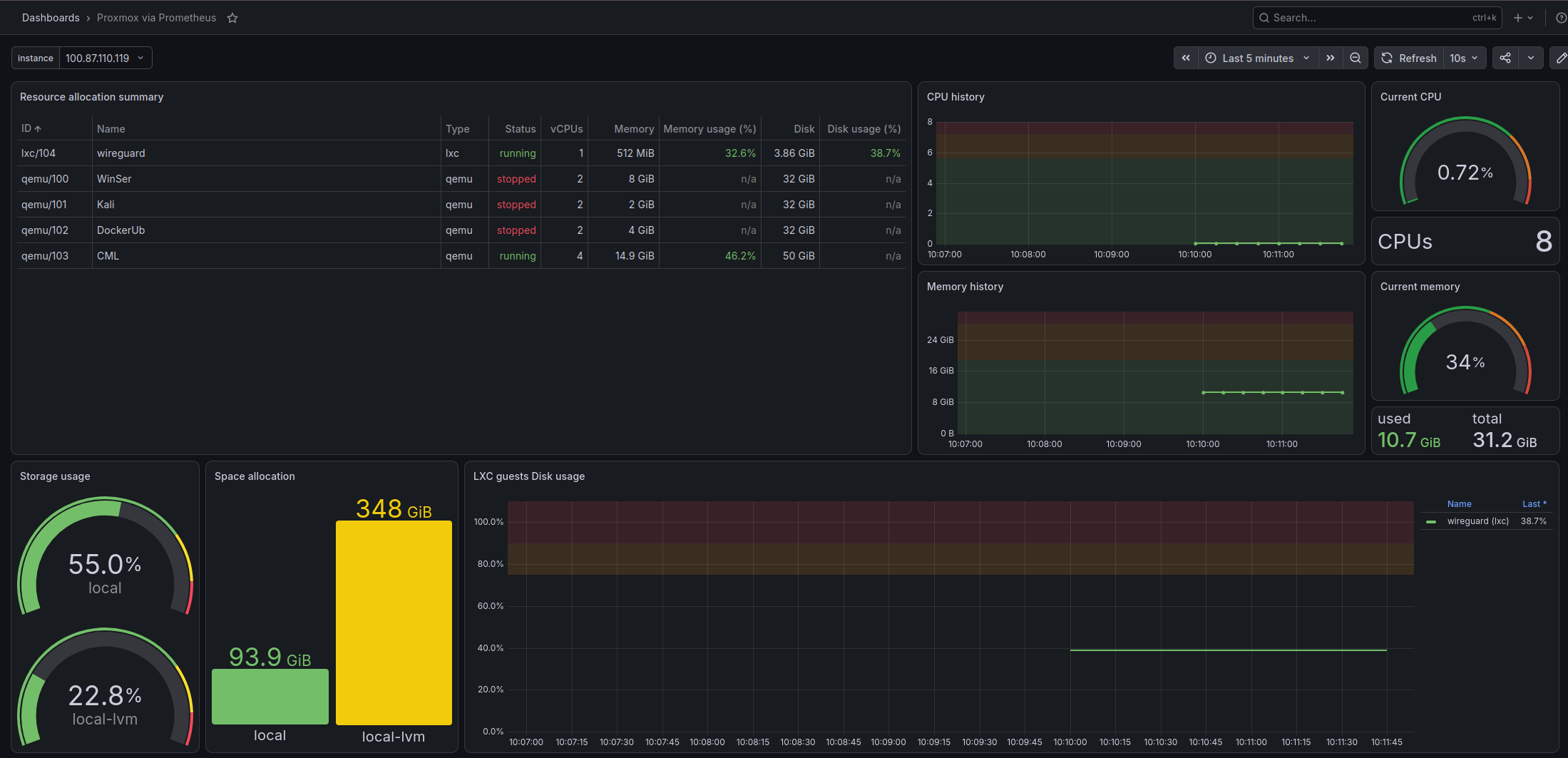
On one of my host machines, I set up several Docker containers in a docker-compose file. These included images of Prometheus PVE Exporter to pull data from my server via API, Prometheus itself to store data, and Grafana to visualize the data in a readable format. Below is a screenshot of one of my Grafana dashboards that shows my server's metrics. In addition, at the bottom of this page, I have some of my server's metrics in real time queried via PromQL (Prometheus Query Language).
Step 4: Automating server management with Ansible
Although my server is running on a laptop, that doesn't mean that I wouldn't run my Proxmox VE on a stronger machine later on. I wanted to practice automating creating and deleting my VMs with Ansible so I can apply it in the future. I started creating a user on Proxmox that I can use whenever I run a playbook. Then I started by making a playbook to make a VM with nothing in it to test if my ansible playbooks could interact with my system.
Status: in progress, last updated August 2026. The server, Windows Server VMs, and monitoring are running; the Ansible automation is partially built.
Challenges and Solutions
Issue 1: DHCP Leasing not working
When I first tested whether my Kali Linux machine could get an IP address after setting up DHCP on my Windows server, it could not get an IP address. I looked on my Windows instance to find out why it wasn't leasing addresses until I learned that I needed to authorize my server. By default the DHCP server is not authorized until I manually do so in Active Directory. I simply turned it on and it started leasing IPs to my Proxmox VMs.
What's Next
I plan to create three more playbooks; a cloud-init template builder, another to clone from the cloud-init template, and finally a teardown playbook to delete VMs that I no longer need. Once I finish this, I will have completed a full IaC pipeline that I can use to manage my server and its VMs.
What I Learned
From this project, I learned how to use a Type-1 hypervisor and the difference between Type-1 and Type-2. With VirtualBox, my VMs were competing with Windows or Linux and everything else those systems were already doing. Proxmox has no desktop OS underneath it taking a share, so the resources I assign to a VM are much closer to what that VM actually gets.
I also applied a lot of CCNA concepts that I studied about into a project that I built. A Proxmox bridge behaves like a Layer 2 switch, so creating a second bridge gave me two separate broadcast domains on one machine, and I could watch which devices could reach each other and which could not. Setting up DHCP on Windows Server made scopes and leases concrete in the same way, especially when I added a third VM and watched it receive the next address in the range. The authorization problem in the challenges section taught me why server authorization is important, because the answer was not a misconfiguration. Active Directory requires DHCP servers to be authorized before they hand out addresses so that a malicious actor can't attach a rogue DHCP server to a domain network and start answering requests.
Setting up monitoring taught me about the moving parts involved. The PVE exporter translates Proxmox metrics into Prometheus format, Prometheus stores them over time, and Grafana renders them in a readable format. I thought of monitoring as a single tool before this, and seeing the pieces split apart explained why Prometheus pulls from its targets instead of having each machine push to it. Setting it up in my LAN taught me how I could send the server's metrics remotely. Port forwarding would have been quicker, but putting the server on a Tailscale network meant I could reach it remotely without exposing the Proxmox web interface to the internet, and that same tailnet is what my website's Kubernetes cluster uses to scrape these metrics.